
Renaming and Moving Fields
You can also change the title of existing, system-provided fields. To do this, you must find the system field in the list. Keep in mind that the name of the field and the title may not be the same, you should be looking for the item with the title that matches the field you want to customize. Next, go to the action menu at the end of that line and click "Customize". 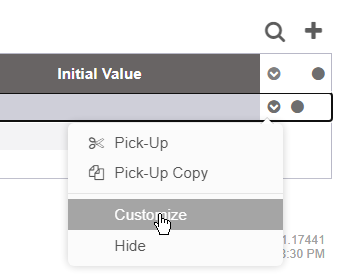
After it's set to be customized, you can then edit the entry and change the title.
Once a field is customized, you can also move the field around in the form. To do this, go to the action menu at the end of the row where the field is you want to move. Then select "Pick Up". Now, find where you want the field to go in the form. Then go to the action menu for that field and click "Drop Above" or "Drop Below". This lets you change the place that the field will be located in the form.