
Adding Tables
Tables are useful for laying out information in a grid-like form of rows and columns. When each item in a list has several aspects that need to be conveyed, a table is often the best way of presenting that.
To insert a table into your article, you can use the table icon on the toolbar: 
This will insert a blank table. You can then click in the table to show the table toolbar. This provides options to insert or delete columns and rows, and also to edit the contents of a cell. There is also an option to highlight a row, which can be useful to distinguish headings or footers of the table, or highlight a column. 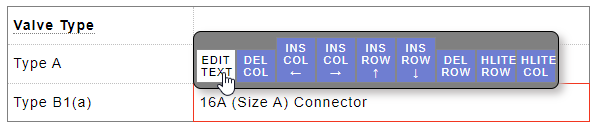
When editing the contents of a cell, a pop-up editor will appear. 
When you are done editing the cell content, click SAVE to commit those changes into the table.
Note: Tables can also be pasted from Microsoft Word and other documents, which allows for more formatting control.